Do my vendors have to do anything?
No. They keep emailing the same people they email now. There is no portal for them, nothing to sign up for and no new address to learn.
Do I need Buildertrend?
No. Each job's list comes in from a spreadsheet, a PDF or a selections export from the software you already use, and anything missing you add in a line. It works beside Buildertrend if you have it, and it never logs in to any other system.
Can my crew use it on site?
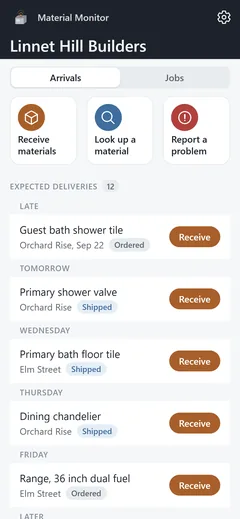
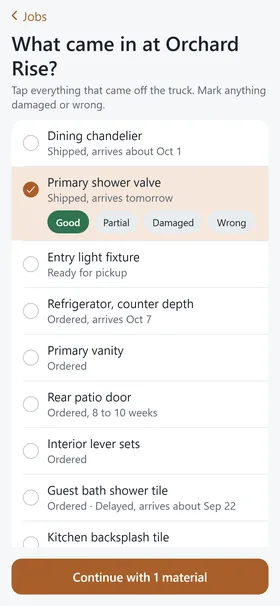
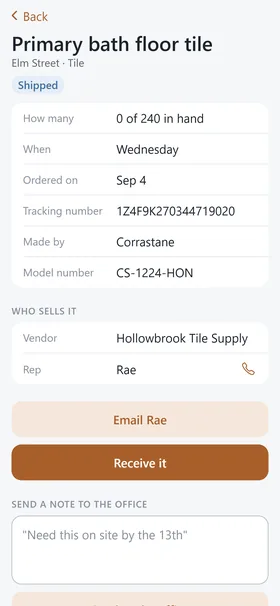
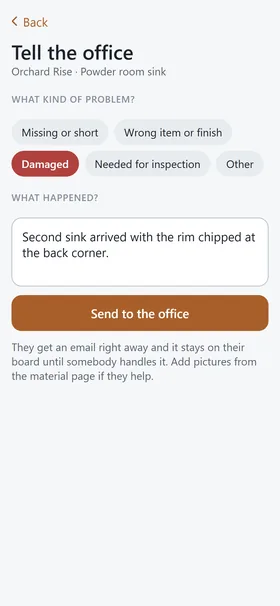
Yes. The field app is the crew's half of the same list, on an iPhone: they receive deliveries, look up any material on any job and report problems to the office. The office invites them from the console, and they sign in with a six digit code sent to their email.
Whose inbox does it read?
Only the ones your office connects or forwards from. Vendor mail usually comes into real people's inboxes, like the coordinator's, the project manager's, the estimator's or an in-house designer's. Some offices also have a shared one. You can connect several and give each one a name. It only reads. It never sends, replies, moves or deletes anything, and it only asks about a new sender when a message looks like an order, a shipment, a delivery or a quote.
Microsoft 365 or Google?
Both. Material Monitor works with Microsoft 365 and Google inboxes, by connecting the inbox or by forwarding from it to your own private Material Monitor address.
Does it email my vendors?
Never on its own. When an order needs a word, it drafts the follow-up, one email per rep with every open item on it, and you send it from your own email in your own words. Your reps hear from you.
Does it track shipments?
Yes. Once a material has a tracking number, Material Monitor checks it with the carrier each day and keeps the expected date current. If the carrier reports a problem, the material is flagged as delayed and the office hears about it. When the carrier says it was delivered, somebody still confirms it arrived.
What happens when it reads something wrong?
You dismiss it and nothing changes. Two things update by themselves, and only on a material that already has a tracking number: a shipping notice in a connected inbox, which can set the tracking, the expected date and Shipped, and the carrier's own tracking, which can move the expected date or flag a delay. Everything else it reads becomes a suggestion with the vendor's sentence quoted beside it, and a person confirms or dismisses it. No email and no carrier can mark a material received.
How does an office get set up?
Somebody in the office signs in at app.materialmonitor.app with a work email and a six digit code, names the company, adds the jobs, brings in each job's selections from a spreadsheet or an export and invites the team. Connecting vendor mail is the last step, and the list works without it.
What does it cost?
There is no public price yet. Founding builders talk it through directly with the builder who made it.
Is this the same company as Walkthrough and Handover?
Yes. Lock Ten Studio makes software for custom home builders and is run by the co-owner of a building company outside Washington DC. Walkthrough is its field-report app, Handover builds the homeowner's manual and Material Monitor keeps track of the materials in between.